Tips & FAQ
BBs sticking to the target are distracting
- Pause the screen to remove BBs
- Press the pause button
 to temporarily stop BB detection, remove the stuck BBs from the target, then press the play button
  to resume.
- Press the pause button
AIRSOFT SPOTTER users have reported the following approaches:
-
Apply a small amount of diluted dishwashing detergent to the surface sheet to adjust stickiness.
- Ref: Aero Style blog
-
Replace the surface sheet with “Actika Super Gel.”
Target detection is unstable
- Make the lighting on the target as even as possible.
- Avoid glare and strong reflections.
- Mount the camera to the left/right/above/below the target rather than diagonally for more stable detection.
BB detection is unstable
- Tap the exposure button
 to open the exposure/brightness
adjustment dialog.
to open the exposure/brightness
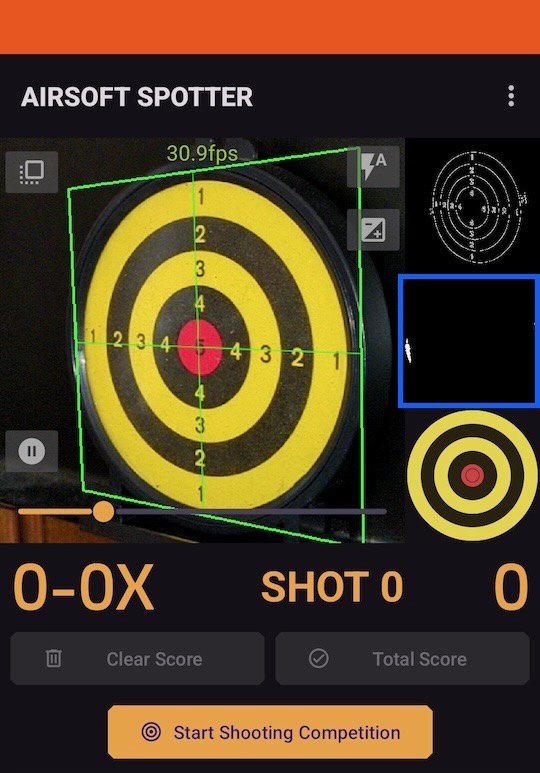
adjustment dialog. - In the target black-and-white view (blue-framed area below), adjust so that BBs appear entirely
white while the background is black.
- Exception: For Tokyo Marui “Pro Catch Target,” the white rings and score numbers can remain white.
- In the camera preview, the BB position should consistently be enclosed by a green circle.
- If the circle is yellow or red, the BB is not white enough in the target black-and-white view.
- Conversely, if a circle appears anywhere other than on the BB, the background is not black enough in the target black-and-white view.
- Rotate your phone so the green horizontal and vertical guide lines align with the actual target.
Remove ads
Menu → “Hide ADs for free”: watch a short video to hide banner ads for a while and use a larger viewing area.
Data backup (Export)
We recommend regularly backing up your registered airsoft guns and shooting results. You can back up your data from Settings → Data Export.
Use a remote camera
With two smartphones, you can use one to capture the target while keeping the other near you to check scores.
- In Settings → Remote Camera Settings, turn on “Make this device the sender” on one device and “Make this device the receiver” on the other.
- Return to the main screen and tap the Send and Receive buttons.
- On the sender, detect the target with the camera.
- After detection, the receiver can display scores and start shooting competition.
- Displaying and saving shooting results are done on the receiver.
- Shooting videos cannot be recorded while using a remote camera.
- The communication range is about 15–30 ft.